Every listing has a status that tells you where it is: still being written, waiting to be checked, live on the website, or sent back. This page explains every status and what to do next.
Where to see the status
Open the listing from All Properties (or My Properties). The status is shown as a coloured label next to the property code, and the status tracker on the right shows the whole journey.
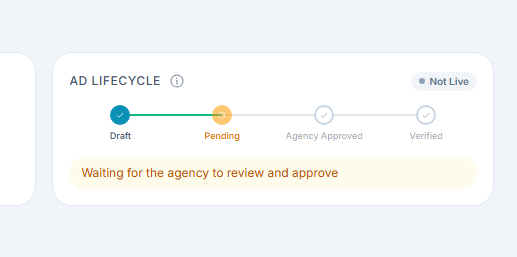
Agency listings go through four stages:
Draft → Agency → Agency Approved → Verified
The tracker also shows Live or Not Live at the top right, and a short message telling you what's happening now.
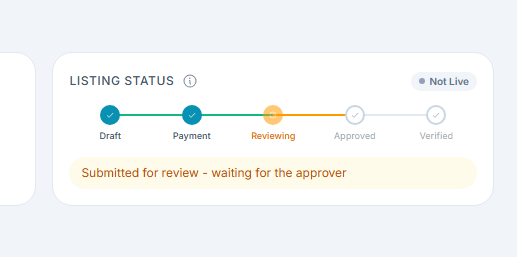
Property Owner listings have a payment stage too:
Draft → Payment → Review → Approved → Verified
The main statuses
Status on screen
What it means
Is it on the website?
What you can do
Draft
You're still writing it, or you edited it and haven't sent it again
No
Finish it and send it for review
Pending Approval
Sent, and waiting to be checked
No
Wait for the decision
Agency Approved (shown as Approved on owner listings)
Approved and live. Waiting for the final check by CommercialProperty.lk
Yes
Promote it, answer inquiries
Verified
Passed the final check
Yes
Promote it, answer inquiries
Agency Rejected
Sent back by the first reviewer, with a reason
No
Fix it and send it again
System Rejected
Sent back by CommercialProperty.lk at the final check, with a reason
No
Fix it and send it again
Permanently Rejected
Rejected too many times. It can't be sent again
No
Property Owners can ask for a refund
Payment statuses
Status on screen
What it means
What you can do
Payment In Progress
You've reached the payment step but haven't paid yet
Pay online or by bank transfer
Payment Verification
Your bank slip is being checked
Wait, usually 1–2 business days
Payment Rejected
Your bank slip wasn't accepted
Upload a correct slip, or pay online
Expired
The listing period has ended
Renew it to make it live again
Renewal In Progress
Your renewal payment is being checked
Wait for confirmation
Renewal Rejected
Your renewal slip wasn't accepted
Upload a correct slip, or pay online
Refund statuses
Status on screen
What it means
Awaiting Refund Details
We need your bank details to send the refund
Refund Pending
Your refund is being processed
Refund Completed
The refund has been paid
Refund Rejected
The refund request wasn't approved
Other labels you may see
These are shown alongside the status.
Label
What it means
Live / Not Live
Whether visitors can see the listing right now
Unpublished
The listing was taken off the website, by you or automatically (for example when a plan ends)
Sold, Rented
The deal is done
Suspended
The agency's account has been suspended
Good to know
A listing is live from "Agency Approved". It doesn't need to be Verified to appear on the website.
Editing a live listing sends it back to Draft. It is checked again before it reappears.
You get a notification every time the status changes.
Related articles
Was this article helpful?
If you still have questions, our support team is here to help.
Submit a Support TicketNot signed in? Sign in first
