A system announcement is a message from the CommercialProperty.lk team, for example about planned maintenance or a new feature.
Who receives an announcement
An announcement can be sent to:
everyone with an account;
everyone with a certain role, such as all Property Owners; or
everyone in one agency.
You only see the announcements meant for you.
Where you see announcements
The bell: the newest announcements are at the top of the panel, under Announcements.
The Notification Center: on the System Announcements tab.
Email: some announcements are also sent by email.
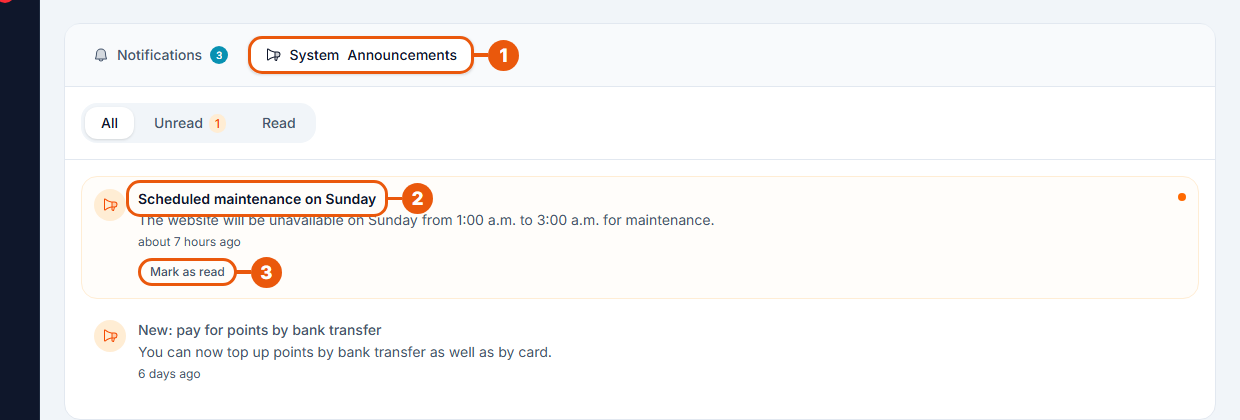
System Announcements tab. An orange number shows how many you haven't read.
An unread announcement: it has a shaded background and an orange dot.
Mark as read.
Use All, Unread and Read to filter the list. Mark all as read at the top of the page clears them all at once.
Some announcements include a link. Click the announcement to open it.
Turning announcements off
Announcements can be switched off under System in your notification preferences. See Notification Preferences.
We suggest keeping them on. Announcements are used for things that affect your account, such as maintenance times.
Sending announcements
Only CommercialProperty.lk administrators can send announcements. See Broadcasting Announcements.
Related articles
Was this article helpful?
If you still have questions, our support team is here to help.
Submit a Support TicketNot signed in? Sign in first
