3.6 Upgrading Your Account Type
If you signed up as Just Browsing and now want to advertise your own property, you can upgrade to a Property Owner account. You keep the same email, password, favorites and inquiries.
⚠️ Upgrading can't be undone. A Property Owner account can't be changed back to Just Browsing.
How to upgrade
Click your name at the top right, then My Profile.
Click the Account tab. It shows your Current Account Type.
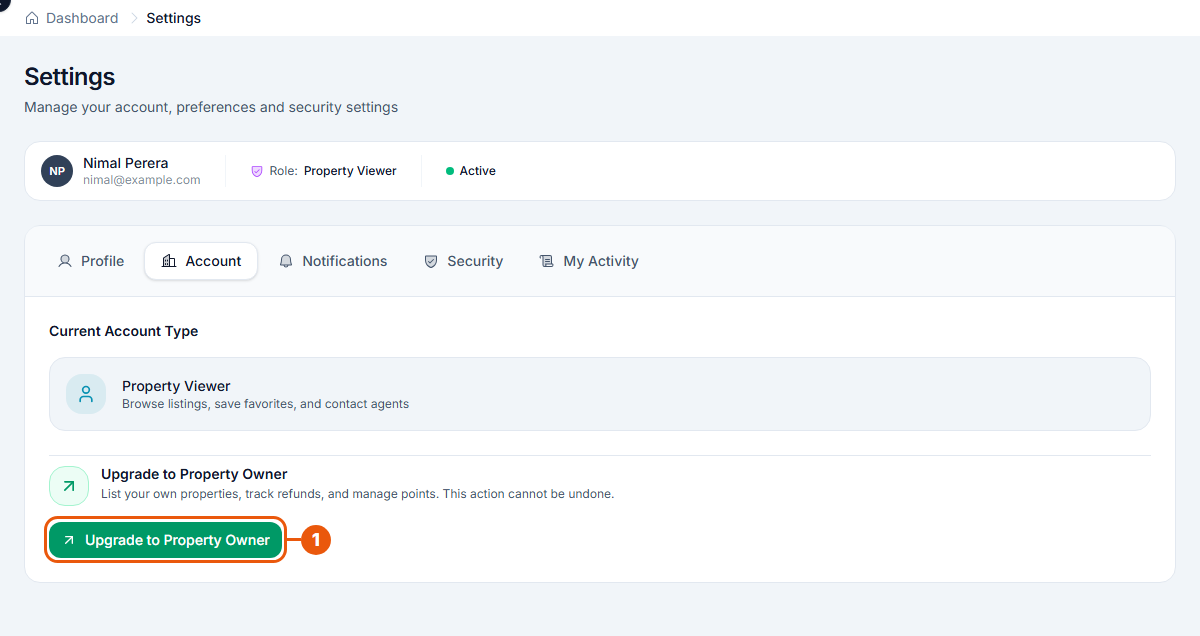
Click Upgrade to Property Owner.
You can also start from your Dashboard: click List a Property.
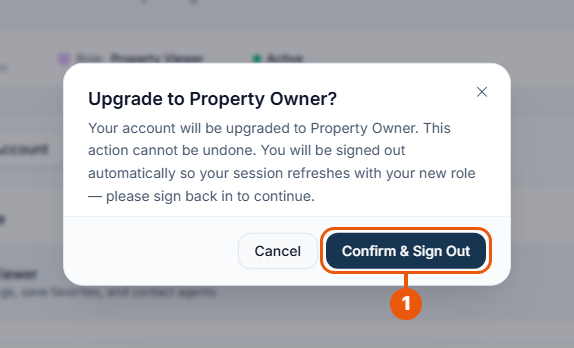
A confirmation message appears.
Click Confirm & Sign Out.
Changed your mind? Click Cancel.
You're signed out automatically. This is normal: it sets up your new account type.
Sign in again with the same email and password.
What changes after upgrading
Your side menu now shows My Properties and Payments, so you can create listings, promote them, buy points and see your payments.
You pay a one-time fee for each listing you publish. See the Pricing page on the website.
Your favorites and your inquiries stay as they were.
Next: create your first listing.
Want to become an agency?
Upgrading to an agency account isn't available at the moment. If you run a real estate agency, please contact us.
Related articles
Was this article helpful?
If you still have questions, our support team is here to help.
Submit a Support TicketNot signed in? Sign in first
