3.5 Viewing Your Own Activity
The My Activity tab is a history of the things you've done in your account, such as signing in, creating or changing listings, and updating your profile. It's useful for checking what changed and when.
Opening My Activity
Click your name at the top right, then My Profile.
Click the My Activity tab.
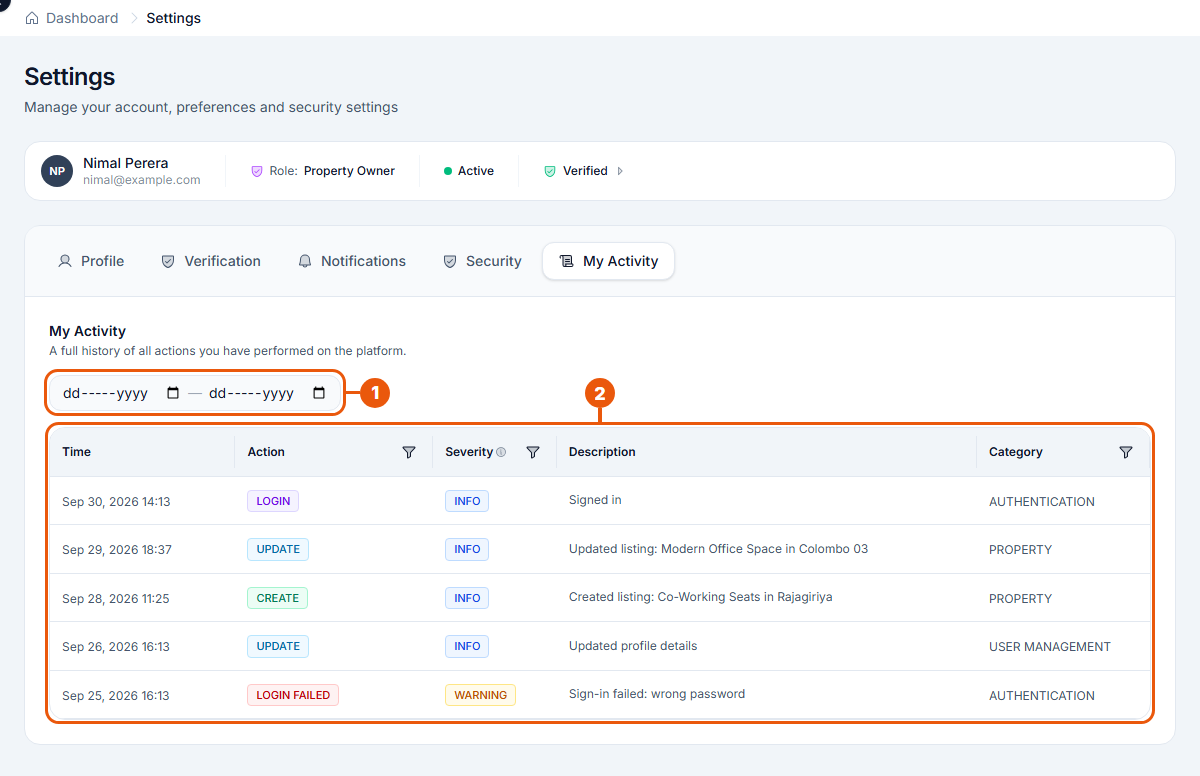
Finding what you need
Date filter: choose a start date and an end date to see only what happened between them.
Activity list: the newest actions are at the top. Each line shows:
Column
What it means
Time
When it happened
Action
What was done, for example Login, Create, Update or Login failed
Severity
How important it is: Info (normal), Warning (worth a look) or Critical (needs attention)
Description
What happened, in plain words, for example "Updated listing: Modern Office Space in Colombo 03"
Category
The area it belongs to, for example Authentication (signing in) or Property (listings)
To see only one kind of entry, click the filter icon next to Action, Severity or Category and choose what to show.
Good to know
This tab shows only your own actions, not those of other people in your agency.
A Login failed warning means someone typed the wrong password for your account. If it wasn't you, change your password and check your signed-in devices.
Related articles
Was this article helpful?
If you still have questions, our support team is here to help.
Submit a Support TicketNot signed in? Sign in first
