Deleting removes a listing from your account for good. It can't be undone.
If you only want to hide the listing for a while, unpublish it instead. See Taking a Listing Off the Website and Putting It Back.
What deleting does
Removes the listing from the website.
Cancels any review that is in progress.
Removes any promotion on the listing.
Deletes the listing's details and photos permanently.
When you can't delete
Delete Property isn't offered while the listing is:
waiting for a reviewer (Pending Approval);
waiting for a payment to be checked;
part of a refund or renewal that isn't finished.
Wait for that step to finish first.
How to delete a listing
Open All Properties (or My Properties) and open the listing.
Click More actions, then Delete Property.
Read the message and confirm:
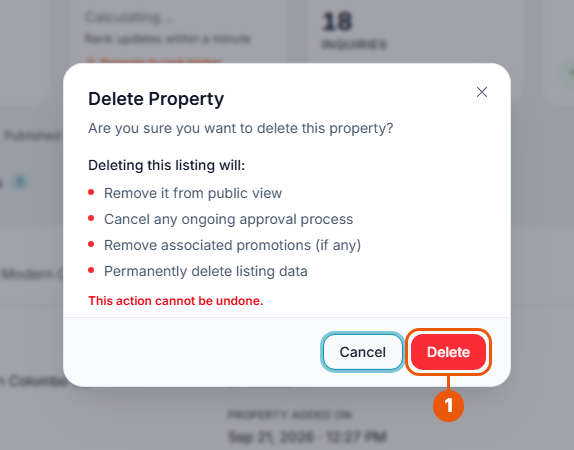
Click Delete.
The listing is removed from your account and from the website.
Click Cancel if you change your mind.
You can also delete from the listings list: click More at the end of the listing's row, then Delete.
Related articles
Was this article helpful?
If you still have questions, our support team is here to help.
Submit a Support TicketNot signed in? Sign in first
