10.4 Saving Favourite Properties
Save the properties you like so you can find them again quickly. Your favorites are kept in your account, so you can see them on any device.
You need to be signed in
Saving needs an account. If you click the heart or Save while signed out, you are taken to the sign-in page. Sign in, then save the property.
No account yet? See Creating an Account (Sign Up).
Saving a property
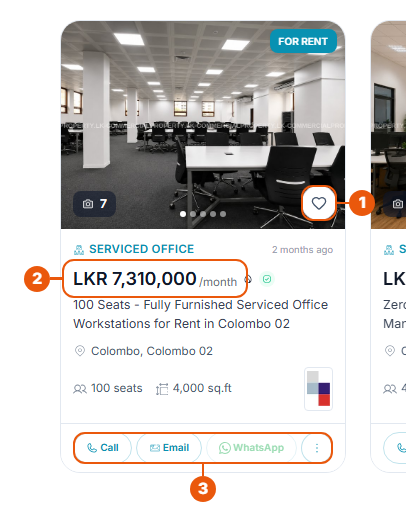
From a property card
Click the heart on the photo.
From a property's page
Click Save at the top right. It changes to Saved.
To remove a favourite, click the heart or Saved again.
Seeing your favorites
Sign in and click Favorite Properties in the side menu.
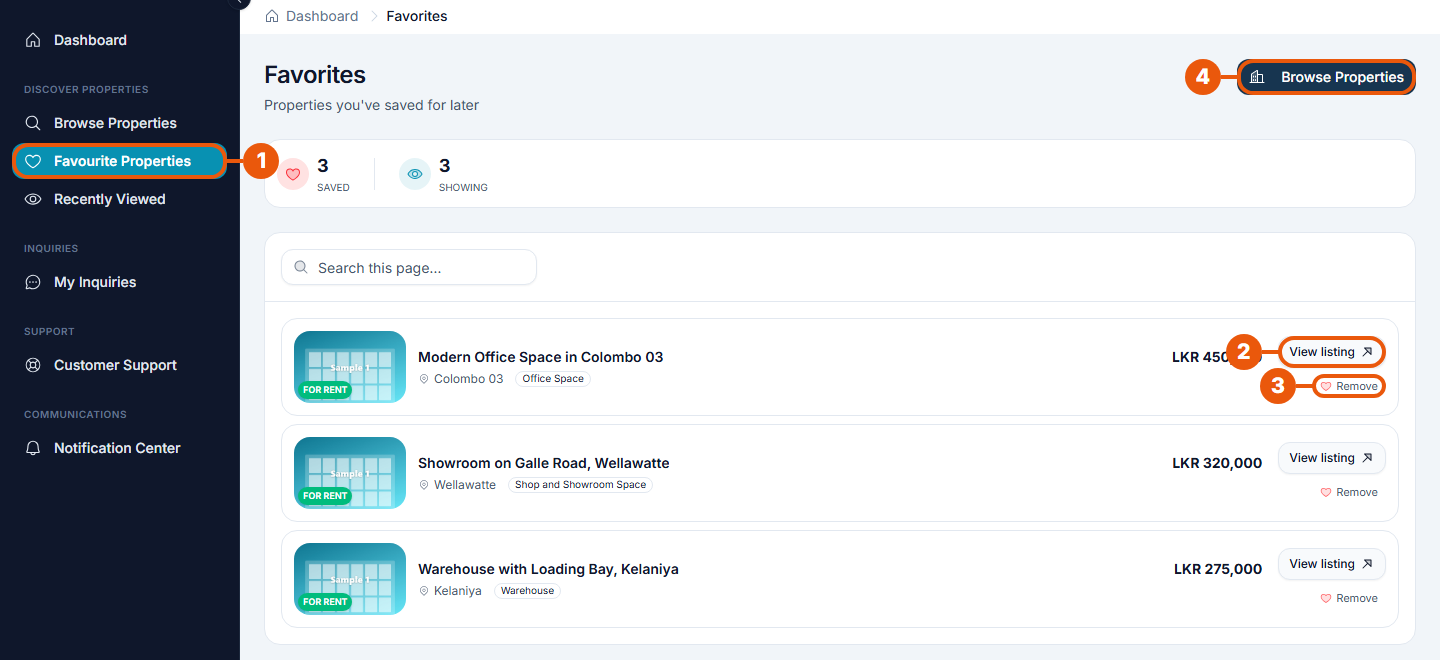
Favorite Properties in the side menu.
View listing: open the property's page.
Remove: take the property off your list.
Browse Properties: go back to the website to find more.
The page shows how many properties you have saved. Use Search this page to find one by name.
Good to know
Saving a property doesn't contact the advertiser. To get in touch, see Sending an Inquiry About a Property.
Related articles
Was this article helpful?
If you still have questions, our support team is here to help.
Submit a Support TicketNot signed in? Sign in first
