A support ticket is a request for help from our support team. You write what the problem is, and you can follow the answers in your account until it is solved.
Anyone with an account can raise a ticket. You must be signed in.
Opening the form
Use any of these:
In your account, click Customer Support in the side menu, then New Ticket.
In the Help Centre, click Raise a Support Ticket.
Filling in the form
The details in this picture are examples only.
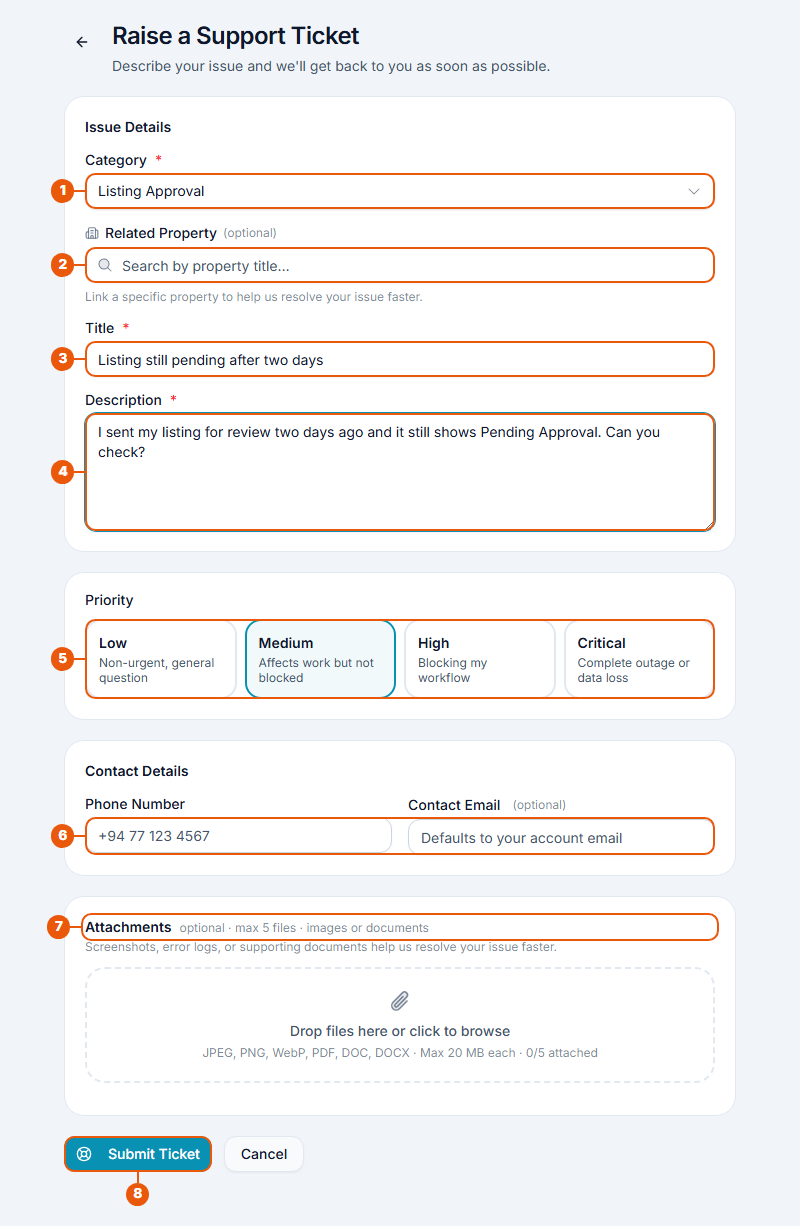
Category: choose what the problem is about. See the list below.
Related Property (only for some categories): type part of the listing's title and choose it. This helps us find it quickly. You can leave it empty.
Title: a short summary, such as "Listing still pending after two days".
Description: what happened, what you expected, and any message you saw on the screen.
Priority: how much the problem affects you. Medium is chosen for you. See below.
Contact Details: a phone number, and an email address if you want replies sent somewhere other than your account email.
Attachments (optional): add up to 5 files, such as screenshots. Pictures (JPEG, PNG, WebP) and documents (PDF, DOC, DOCX) up to 20 MB each.
Click Submit Ticket.
Choosing a category
Category
Use it for
Listing Approval
A listing waiting a long time for checking, or a rejection you don't understand.
Property Publishing
A listing that doesn't appear on the website, or problems taking it off or putting it back.
Subscription / Payment
Plans, points, invoices, bank transfers and refunds.
Account Access / Login
Signing in, passwords and email codes.
Agency Registration
Setting up an agency account.
Lead / Inquiry Issue
Inquiries from buyers or tenants that don't arrive or can't be answered.
Blog / Article
Blog posts and help guides.
Technical Bug
Something on the website that doesn't work as it should.
Document Verification
Checking of your agency or identity documents.
CRM Support
Your contacts list and follow-ups.
General Support
Anything else.
The Related Property box appears for Listing Approval, Property Publishing and Lead / Inquiry Issue.
Choosing a priority
Priority
Choose it when
Low
It's a general question and nothing is stopping you.
Medium
It affects your work, but you can carry on.
High
It stops you from doing your work.
Critical
Nothing works at all, or information has been lost.
Please choose honestly. Our team answers the most urgent tickets first.
After you send it
You see a message with your ticket number, for example TKT-2026-0041, and the ticket opens.
You get a notification that your ticket was received.
A member of our support team looks at it and replies in the ticket. You are notified each time they reply or change its status.
Keep the ticket number. It helps if you need to talk to us about the same problem.
Tips
One problem per ticket. Separate tickets are solved faster.
Add a screenshot. A picture of the problem often saves a reply.
Include the listing title or invoice number if your question is about one.
Related articles
Was this article helpful?
If you still have questions, our support team is here to help.
Submit a Support TicketNot signed in? Sign in first
