6.2 Property Types & Listing Types
Every listing has a listing type (is it for sale or for rent?) and a property type (what kind of property is it?). You choose both at the very start of the listing form, and visitors use the same choices to search.
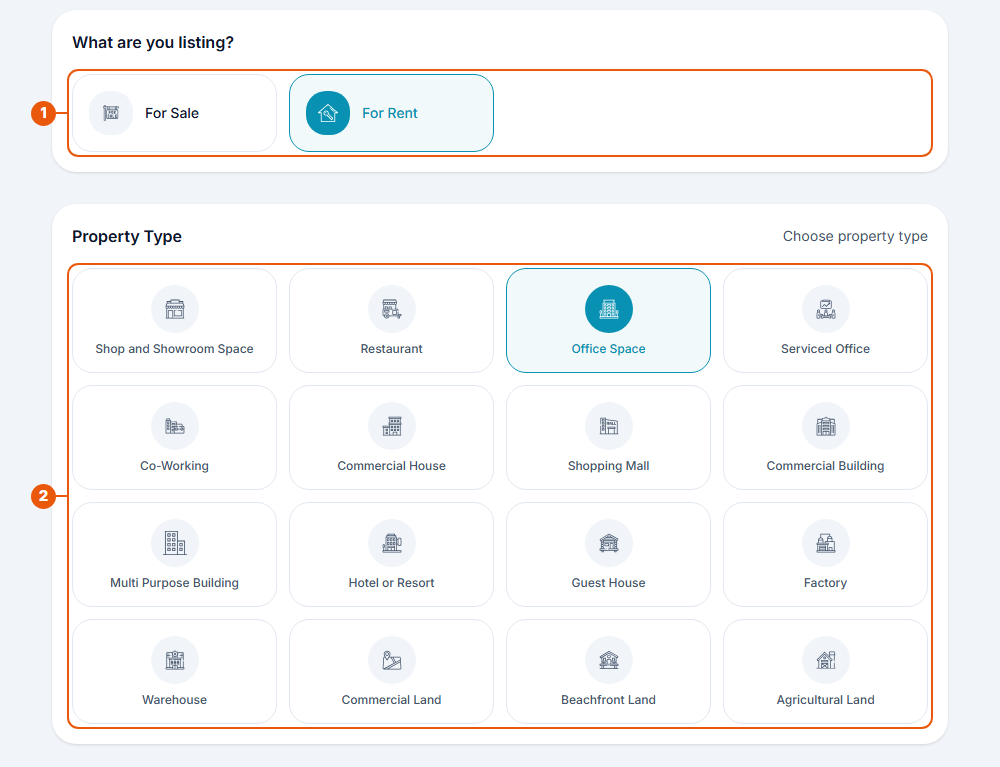
What are you listing? Choose For Sale or For Rent.
Property Type: choose the one that fits your property best.
Listing types
Listing type
Use it when
For Sale
You want to sell the property
For Rent
You want to rent the property out
Property types
There are 16 property types, in four groups.
Group
Property types
Commercial
Shop and Showroom Space · Restaurant · Office Space · Serviced Office · Co-Working · Commercial House · Shopping Mall · Commercial Building · Multi Purpose Building
Hospitality
Hotel or Resort · Guest House
Industrial
Factory · Warehouse
Land
Commercial Land · Beachfront Land · Agricultural Land
Choose carefully. The property type decides which details the form asks for next. For example, a building asks for floor area, while land asks for land area, shape and road access.
Other choices you'll make in the form
These appear in Step 2: Property Details.
Choice
Options
Price unit (for rent)
per Month, per Week, per Day, per Sq.Ft, or per Seat
Currency
LKR or USD
Price option
None, Negotiable, Fixed, Nearest Offer, Upwards, or Approximately
Availability
Available Now or Available Soon
Furnishing (buildings)
Fully Furnished, Semi Furnished, or Unfurnished
Floor area unit
Sq.Ft or Sq.M
Related articles
Previous Article
6.1 Before You List: What You Need
Next Article
6.3 The Listing Form: Overview, Drafts and Saving
Was this article helpful?
If you still have questions, our support team is here to help.
Submit a Support TicketNot signed in? Sign in first
