8.9 Seeing How a Listing Is Performing
Each listing's page shows three numbers that tell you how much attention the listing is getting. Use them to decide whether to improve the listing or promote it.
Where to find the numbers
Open All Properties (or My Properties) and open the listing. The numbers are at the top of the page.
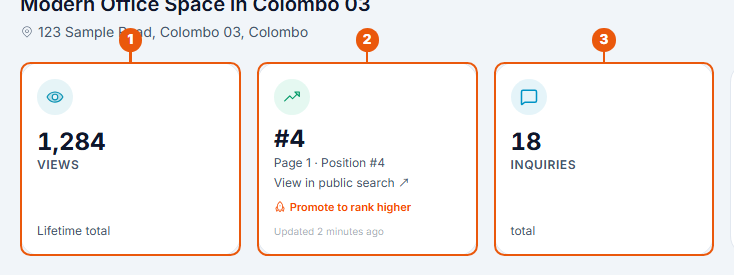
Views: how many times the listing has been opened on the website since it was published.
Position in search: where the listing appears in the website's search results. #4 with Page 1 · Position #4 means it is the fourth listing on the first page.
Inquiries: how many people have contacted you about the listing.
The listings list also has an Inquiries column, so you can compare your listings at a glance.
The position card
What the card shows
What it means
A number, such as #4
The listing's place in the search results. Click View in public search to see it there.
Calculating…
The position is being worked out. It appears within about a minute.
Pending verification
The listing is on the website but hasn't had its final check. It can be promoted once it is Verified.
Not publicly visible
The listing is unpublished. Put it back on the website to get a position again.
Publish to get ranked
The listing hasn't been on the website yet.
The position changes as other listings are added, promoted or removed.
Making sense of the numbers
What you see
What to try
Few views
The listing is hard to find. Check the property type and location, or promote it.
Many views, few inquiries
People find the listing but don't get in touch. Improve the photos, description or price.
Low position in search
Click Promote to rank higher on the card. See Promoting a Listing.
Remember that editing a live listing takes it off the website until it is approved again. See Editing a Listing.
Numbers for your whole agency
Agency members can see views, inquiries and other figures for all listings together on the Performance Analytics page in the side menu. See Agency Performance Analytics.
Related articles
Was this article helpful?
If you still have questions, our support team is here to help.
Submit a Support TicketNot signed in? Sign in first
