The Performance Analytics page shows how your agency's listings are doing: how many people view them, how many get in touch, and which team members and property types bring the most interest.
Who can see it
Agency Super Admins, Agency Admins and Agents.
Opening the page
Click Performance Analytics in the side menu.
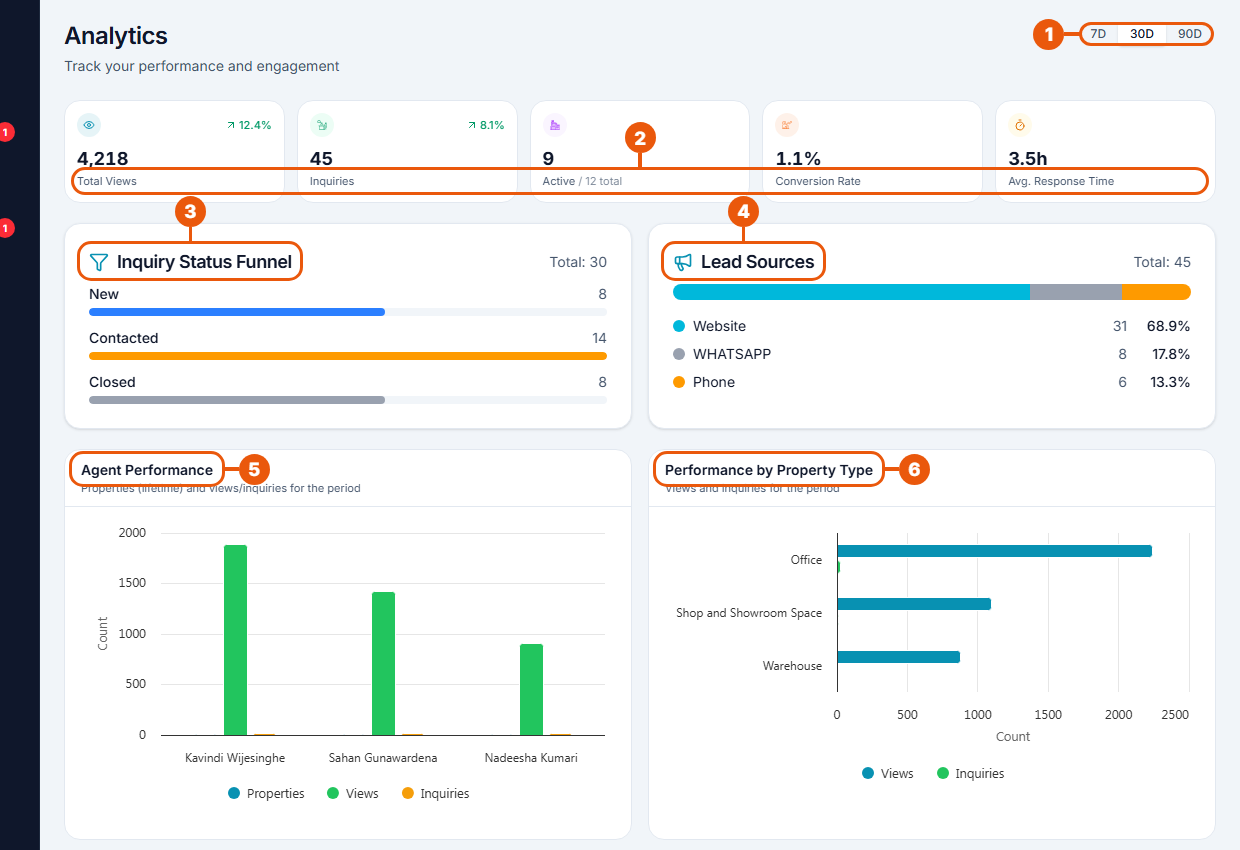
Date range: the last 7, 30 or 90 days.
Summary: total views, inquiries, active listings, conversion rate and average response time. A small green or red figure shows the change from the previous period.
Inquiry Status Funnel: how many inquiries are New, Contacted and Closed.
Lead Sources: where inquiries came from, such as the website, WhatsApp or phone.
Agent Performance: listings, views and inquiries for each team member.
Performance by Property Type: views and inquiries for each kind of property.
Further down the page
Section
What it shows
Views Over Time
Daily views across all your listings
Traffic Sources
Where visitors came from: typed the address directly, Google, Facebook, WhatsApp and others
Top Performing Properties
The listings with the most views
Boost Usage & ROI
Your running promotions, and how many more views promoted listings get than others
When Your Audience Browses
The days and hours when most people look at your listings
Reading the figures
Conversion rate: the share of views that turned into inquiries.
Average response time: how long, on average, before a new inquiry got a reply. Lower is better.
Trend: the arrow and percentage compare this period with the one before it.
Using the figures
Few views? Check your photos and titles, or promote your best listings. See Promoting a Listing.
Many views but few inquiries? Improve descriptions and prices.
Slow response time? Check the Inquiries page more often. See Managing Incoming Inquiries.
Best times to post? When Your Audience Browses shows when most people are looking.
If your listings haven't been viewed yet, the page says "No analytics data".
One listing at a time
For the figures of a single listing, see Seeing How a Listing Is Performing.
Related articles
Was this article helpful?
If you still have questions, our support team is here to help.
Submit a Support TicketNot signed in? Sign in first
