The Activity Logs page is a record of what people have done on CommercialProperty.lk: sign-ins, listing approvals, payments approved, settings changed, agencies suspended. Use it to find out who did what, and when.
Who sees what
Role
What the log covers
Super Admin
Everything on the platform
Financial Officer
Activity across the platform
Customer Support Agent
Activity across the platform, to help answer questions
Agency Super Admin
Their own agency only. See Members Activity: The Agency Activity Log
Opening the log
Click Activity Logs in the side menu.
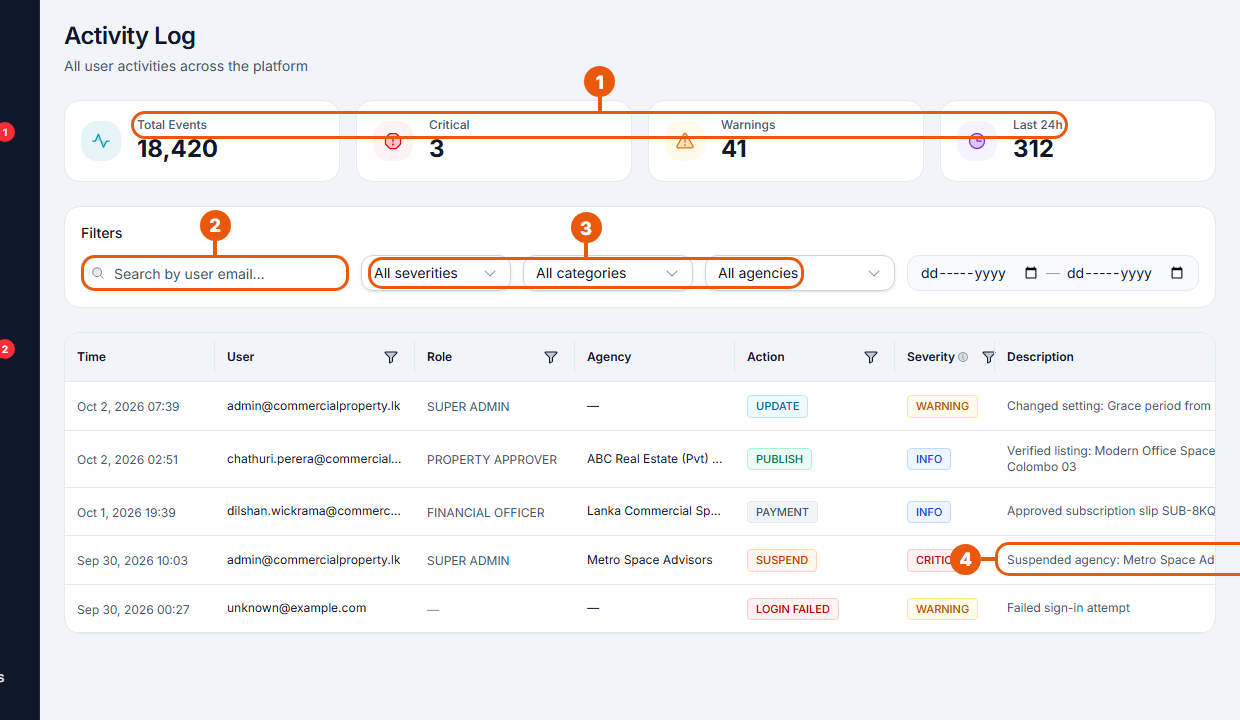
Summary: total events, how many are Critical or Warnings, and how many happened in the last 24 hours.
Search by user email.
Filters: severity, category and agency. Pick a date range with the two date boxes.
Description: what happened.
Each row shows the time, the user and their role, the agency, the action, the severity and a description. Click the small funnel next to a column heading to filter by that column.
Severity
Severity
Meaning
Examples
Info
Normal activity
Listing verified, payment approved, signed in
Warning
Worth a look
Setting changed, role changed, failed sign-in
Critical
Important change
Agency suspended, listing deleted
Common checks
Who changed a setting? Filter by the Admin category.
Unusual sign-in attempts? Filter by Authentication and look for Login Failed.
What happened to an agency? Choose the agency in the agency filter.
What did a staff member do? Search by their email.
The log is a record only. Nothing can be changed or undone from here.
Related articles
Was this article helpful?
If you still have questions, our support team is here to help.
Submit a Support TicketNot signed in? Sign in first
