The Super Admin can change the platform's main settings: prices, time limits, limits on photos and messages, and the bank details shown for transfers.
Changes take effect immediately for everyone. Check twice before saving.
Opening the settings
Click My Profile at the bottom of the side menu.
Click the System Config tab.
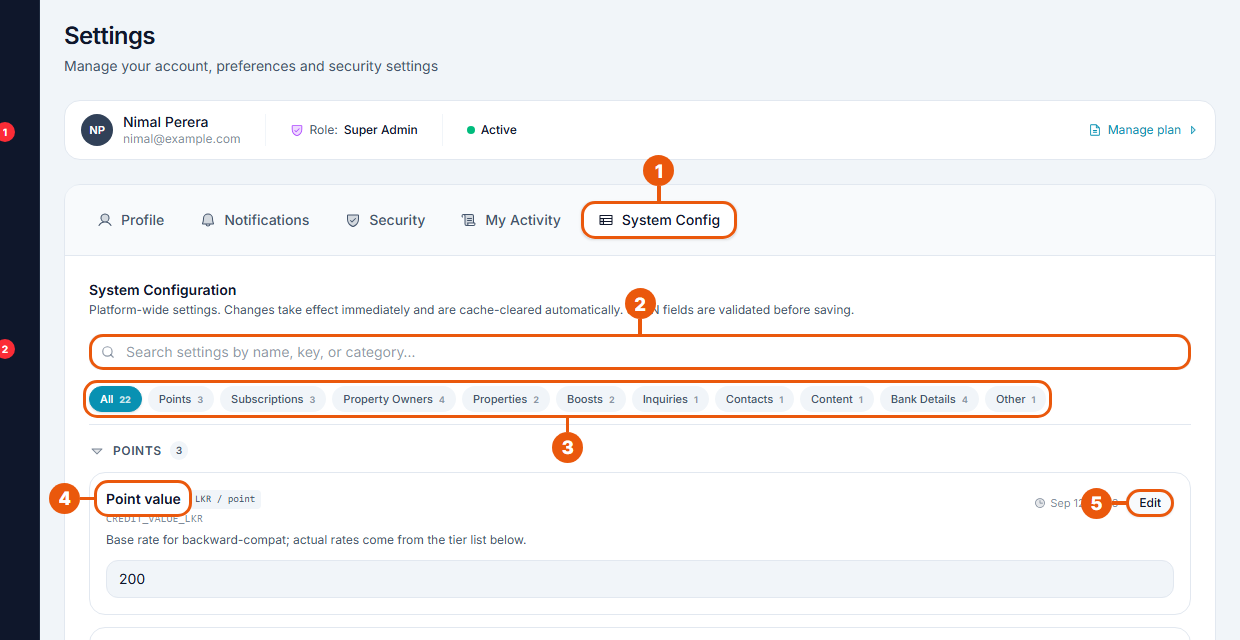
System Config tab.
Search settings by name.
Categories: show one group of settings.
A setting: its name, a short explanation and its current value.
Edit: change it.
Changing a setting
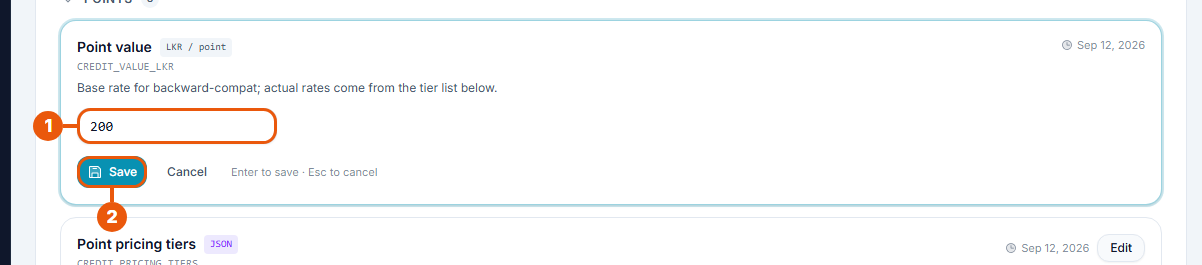
Type the new value.
Click Save. Click Cancel to leave it unchanged.
Each setting shows when it was last changed. Every change is recorded in the Activity Logs.
The settings
Category
Setting
What it controls
Value on 1 October 2026
Points
Point value
The base value of one point
LKR 200
Point pricing tiers
The price per point for different quantities
180 down to 120
Point packages
The packs on sale and their prices
Micro, Starter, Growth, Pro
Subscriptions
Free trial duration
The length of a free trial set up by staff
7 days
Grace period
Days after a plan ends before listings come off the website
Not public
Upgrade minimum charge
The smallest amount charged for an upgrade, as a % of the new plan
Not public
Yearly subscription discount
Discount on yearly plans
20%
Property Owners
Ad slot fee
The listing fee for one listing
LKR 5,000
Listing expiry
Days an owner's listing stays on the website
30 days
Rejection cap
Rejections allowed before a listing is permanently rejected
2
Refund on permanent rejection
The usual refund, as a % of the fee
Not public
Boosts
Home page sponsored slots (total)
Homepage Sponsored places on the website
10
Sponsored slots per agency
Places one agency or owner may hold at once
4
Inquiries
Max messages per thread
Messages allowed in one inquiry conversation
Not public
Contacts
Max contacts per account
Saved contacts per agency or owner
Not public
Content
Featured article category slots
Featured categories in the help centre
Not public
Properties
Min / Max images per property
Photos needed and allowed on a listing
3 / 12
Bank Details
Bank name, account number, account holder, branch
The account shown to customers paying by bank transfer
"Not public" means the value isn't shown on the public website; check it on this page.
Take extra care with
Prices and fees: they change what customers pay from the moment you save. Plans already paid for are not affected.
Yearly subscription discount: changing it re-prices all three yearly plans at once.
Bank details: customers transfer money to this account. A mistake sends payments to the wrong place.
Point pricing tiers and point packages: these are written in a special format. Change only the numbers and keep the layout exactly as it is. The page checks the format before saving.
Min and max images: the minimum can't be more than the maximum.
Related articles
Was this article helpful?
If you still have questions, our support team is here to help.
Submit a Support TicketNot signed in? Sign in first
