A coupon code is a short code from CommercialProperty.lk, such as WELCOME25, that gives your agency a discount on a monthly plan. This article shows where to enter a code and what happens next.
Only the Agency Super Admin can use a coupon.
The codes and amounts in these pictures are examples only.
What a coupon can do
What it applies to
Monthly plans only (Basic, Standard, Enterprise). Not yearly plans, and not points.
The discount
A percentage off (for example 25%), or a fixed amount off (for example LKR 1,000).
How long it lasts
Depends on the code: the first payment only, a set number of months, or every month for as long as you stay on a monthly plan.
How many times
Each code can be used once. When one agency has used it, nobody else can.
One at a time
Your plan can have only one coupon discount running.
Which plans
Some codes work only for certain plans.
Property Owners can use a coupon on a listing fee. See Step 5: Paying the Listing Fee (Property Owners).
Two ways to use a code
When
Where
When the discount starts
You are paying now: choosing a monthly plan, or moving to another one
In the payment window
On this payment
You already have a monthly plan and aren't changing it
Redeem a coupon on the Subscription page
At your next renewal
Using a code when you pay
Open Subscription & Points, choose your monthly plan, and click Subscribe Now (or Upgrade Now). See Subscribing to a Plan. The coupon box is in the Order Summary on the right of the payment window.
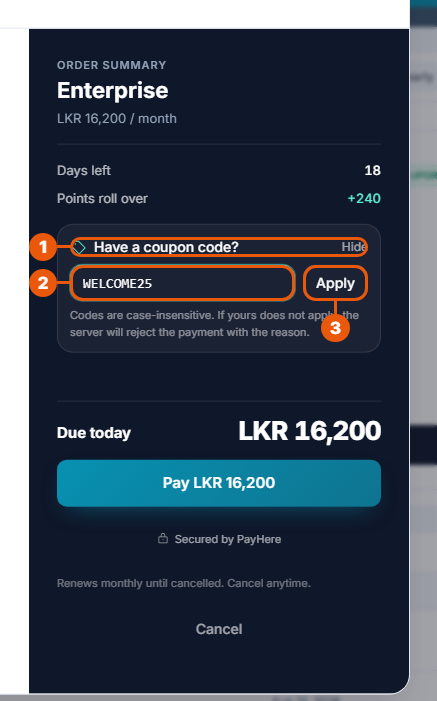
Click Have a coupon code? to open the box.
Type or paste your code. Capital or small letters both work.
Click Apply.
If the code is accepted, the summary shows the discount:
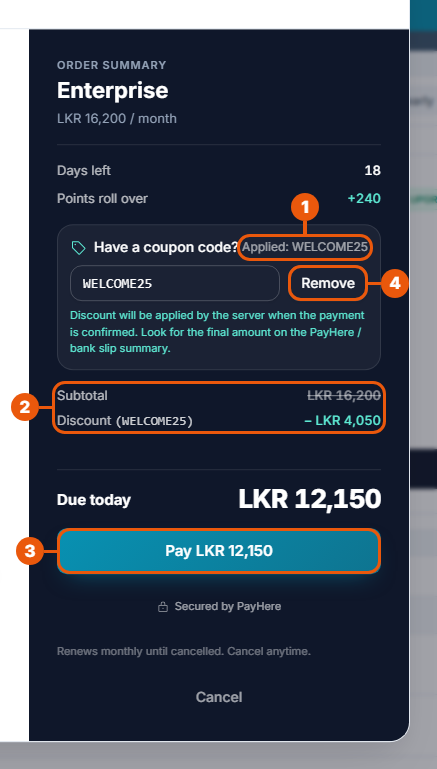
Applied and your code.
Subtotal (the price before the discount, crossed out) and Discount (what the code takes off).
Due today and the Pay button show the lower amount. Finish paying as usual, by card or bank transfer.
Remove takes the code off again.
Good to know:
The coupon box appears only when you are paying for a monthly plan.
If you pay by bank transfer, transfer the discounted amount shown.
The code is used up only when your payment succeeds. If the payment fails or you close the window, you can use the code again.
Using a code on the plan you already have
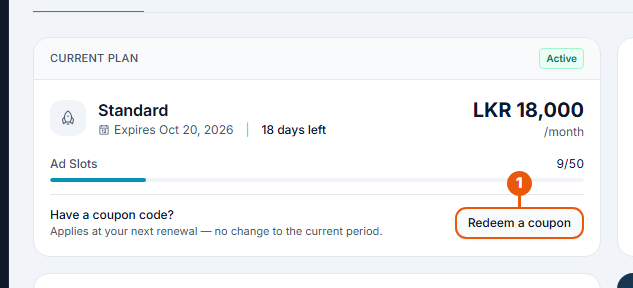
Open Subscription & Points.
In the Current Plan box, click Redeem a coupon.
The button is shown when you have an active, paid monthly plan with no coupon already running.
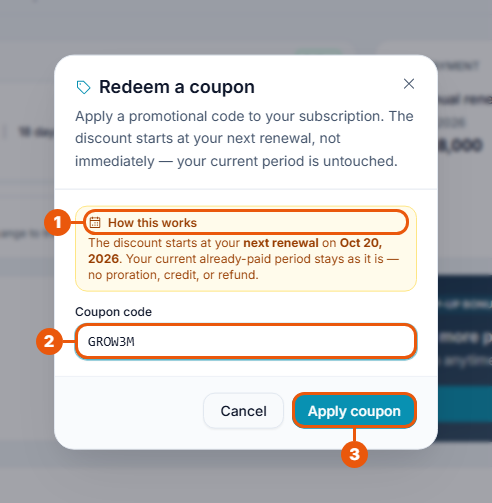
How this works shows the date of your next renewal. That is when the discount starts.
Enter your coupon code.
Click Apply coupon.
You see Discount scheduled with the date. Click Done.
The month you have already paid for doesn't change. Nothing is refunded or credited for it.
Seeing your coupon
Once a coupon is on your plan, the Current Plan box shows it.
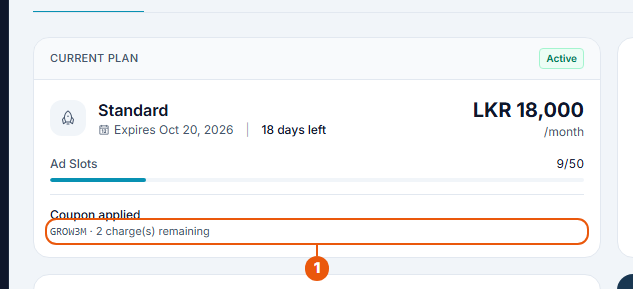
Coupon applied: your code, and how much of the discount is left:
… charge(s) remaining: how many more monthly payments get the discount;
lifetime discount: every monthly payment gets it;
discount window exhausted: the discount has been used up;
paused: the discount is on hold, for example while you are on a yearly plan.
What happens to the discount later
Each renewal in the discount period is charged at the lower price, automatically.
Moving to another monthly plan: the discount carries on with the new plan's price.
Moving to a yearly plan: coupons don't apply to yearly plans, so the discount is paused.
Cancelling your plan: the coupon is not given back. A used code can't be used again.
If we switch a code off after you have used it, you keep the discount you were given.
If the code isn't accepted
Message
What it means
This coupon code is not valid.
The code doesn't exist. Check for typing mistakes. Codes use only letters, numbers, hyphens and underscores, 4 to 32 characters.
This coupon has expired.
Its end date has passed.
This coupon is not yet active.
Its start date hasn't come yet. Try again later.
This code has already been used.
Someone has already used it. Each code works once.
This coupon has been deactivated.
We have switched the code off.
This coupon does not apply to the selected plan.
The code is for a different plan. Choose that plan, or use another code.
Coupons only apply to monthly plans.
You chose a yearly plan, or your current plan is yearly.
You already have a discount active on this subscription.
Only one coupon can run at a time.
You already have an active subscription…
Use Redeem a coupon on the Subscription page instead.
This code can't be used for listing fees.
The code is for agency plans, not for a Property Owner's listing fee.
If a code you were given doesn't work, raise a support ticket with the category Subscription / Payment and include the code.
Related articles
Previous Article
12.7 Cancelling Your Subscription
Next Article
12.9 Tracking Your Bank Transfer Requests
Was this article helpful?
If you still have questions, our support team is here to help.
Submit a Support TicketNot signed in? Sign in first
