Move to a bigger plan when you need more ad slots or more points. An upgrade starts straight away, and you pay only for the difference.
What counts as an upgrade
Moving to a plan with more ad slots: Basic → Standard → Enterprise.
Moving from monthly to yearly on the same plan.
What happens when you upgrade
The new plan starts immediately.
Your new plan period starts today and runs for a full month (or year).
You pay a reduced amount today, because the days left on your old plan are taken off the price.
The points you still have are kept, and the new plan's points are added.
Your listings stay on the website throughout.
How to upgrade
Click Subscription & Points in the side menu and scroll to Choose a Plan.
Click Upgrade Now under the plan you want. For a yearly plan, click Yearly first.
Check the details and pay:
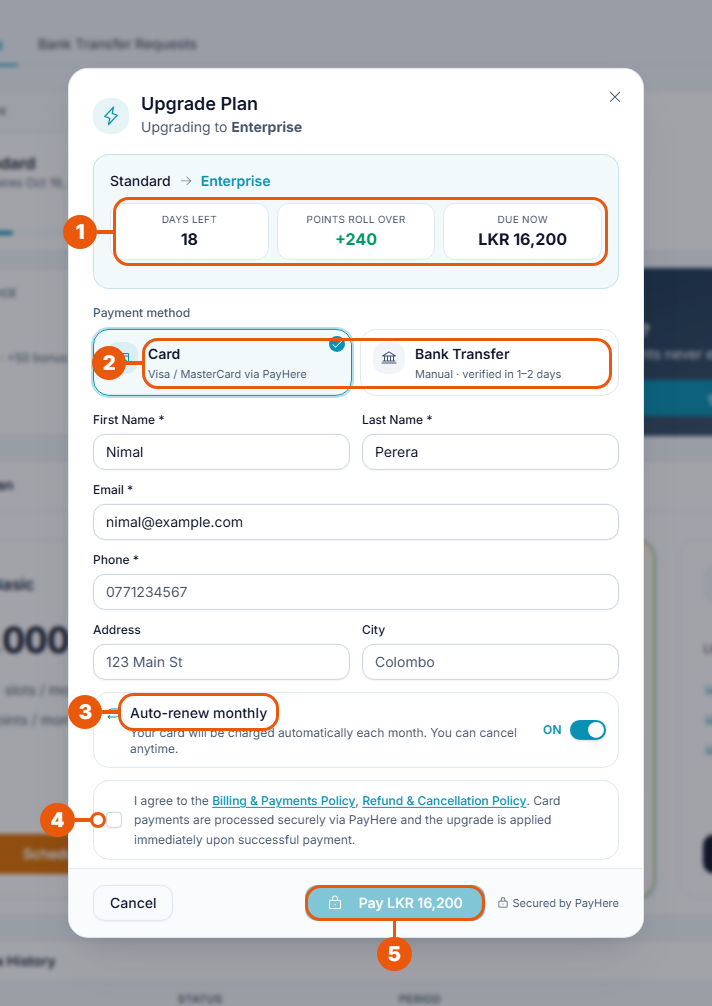
Summary:
Days left on your current plan;
Points roll over: the points you keep;
Due now: what you pay today.
Choose Card or Bank Transfer.
Auto-renew monthly: ON or OFF (card only).
Tick the box to agree to the payment policies.
Click Pay LKR ….
By card: the upgrade is applied as soon as the payment goes through.
By bank transfer: the upgrade is applied when our finance team approves your slip, usually within 1–2 business days. Until then you stay on your current plan. See Tracking Your Bank Transfer Requests.
If nothing is due, the window says so and you click Confirm Upgrade instead of paying.
When you can't upgrade
The Upgrade Now button won't work while:
a downgrade is scheduled;
your next period is already pre-paid;
a bank transfer request is waiting to be checked.
A message tells you which one applies. See Downgrading and Scheduling Plan Changes.
Upgrading during a free trial
You can upgrade at any time during your trial. You then pay for the new plan and the trial ends.
Related articles
Was this article helpful?
If you still have questions, our support team is here to help.
Submit a Support TicketNot signed in? Sign in first
