You can cancel your agency's plan at any time. Read this first, because cancelling takes effect immediately and can't be undone.
Important: When you cancel, all your listings are taken off the website straight away, even if you have paid days left.
What happens when you cancel
Your agency moves to the free Explorer plan, which has no ad slots.
Every listing you have on the website is taken off it.
Any automatic renewal stops. Your card isn't charged again.
Your points are kept for now, both plan points and top-up points. See "What about my points?" below.
Your listings, team and inquiries stay in your account. Nothing is deleted.
Other choices to think about first
If you want to…
Do this instead
pay less
Downgrade to a smaller plan. See Downgrading and Scheduling Plan Changes.
keep your listings on the website until the days you paid for run out
Don't cancel. If you renew by hand, simply don't renew when the plan ends. If automatic renewal is on, contact support to have it switched off.
hide a few listings
Unpublish them. See Taking a Listing Off the Website and Putting It Back.
How to cancel
Open Subscription & Points.
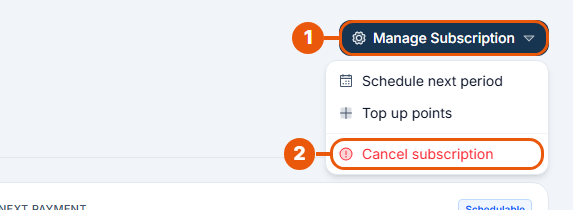
Click Manage Subscription.
Click Cancel subscription.
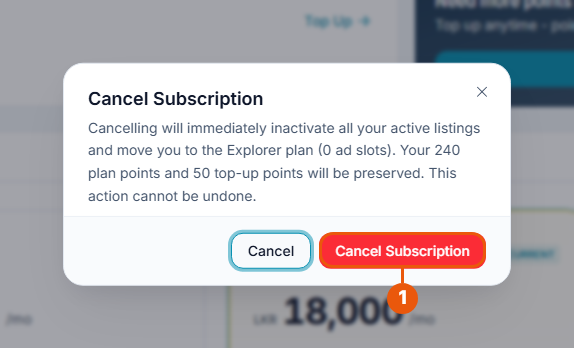
Read the message. It tells you how many points you will keep.
Click Cancel Subscription to confirm.
Click Cancel to close the message and keep your plan.
When "Cancel subscription" isn't shown
You won't see it:
during a free trial (the trial simply ends by itself);
during the grace period;
while a downgrade is scheduled or the next period is pre-paid;
on the free Explorer plan.
Refunds
Cancelling doesn't automatically refund the days you haven't used. See the Refund & Cancellation Policy, linked at the bottom of every page of the website.
What about my points?
Your points move with you to the Explorer plan. If your agency stays without a paid plan for a full billing period, the remaining points are removed. See Understanding Points.
Coming back
Subscribe to a plan again at any time. See Subscribing to a Plan. After your plan starts, check your listings and put back on the website any that are still off it.
Related articles
Was this article helpful?
If you still have questions, our support team is here to help.
Submit a Support TicketNot signed in? Sign in first
