An agency needs a plan to put listings on the website. The plan decides how many listings you can have live at once and how many points you get each month.
Prices were checked on 1 October 2026. The Subscription page always shows the current prices.
The plans
Plan
Each month
Each year
Ad slots
Points each month
Explorer
Free
–
0
0
Basic
LKR 9,000
LKR 86,400
10
60
Standard
LKR 18,000
LKR 172,800
50
300
Enterprise
LKR 27,000
LKR 259,200
200
1,000
Explorer is where every new agency starts. It is free, but it has no ad slots, so you can't publish listings on it. You can set up your agency, invite your team and prepare draft listings.
Enterprise also includes priority support.
What a plan gives you
Ad slots. One ad slot holds one listing on the website. A Standard plan with 50 ad slots means up to 50 listings live at the same time. When you take a listing off the website, its slot is free again. See Ad Slot Management and Bulk Unpublishing.
Points. Points are added to your balance every month and are used to promote listings. See Understanding Points.
Paying monthly or yearly
Monthly
Yearly
You pay
Every month
Once a year
Price
Full price
20% less
Points
Added every month
Added every month
Free trial
Available
Not available
Who can manage the plan
Only the Agency Super Admin. Agency Admins and Agents don't see the Subscription page.
The Subscription page
Click Subscription & Points in the side menu.
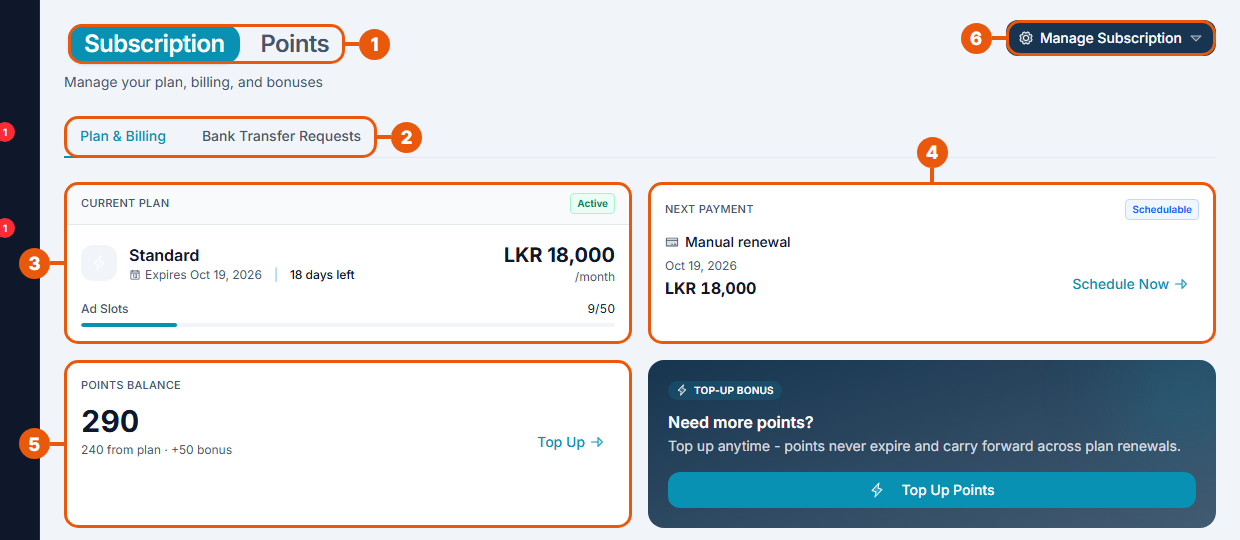
Subscription / Points: switch between your plan and your points.
Tabs: Plan & Billing and Bank Transfer Requests.
Current Plan: your plan, the date it ends, the days left and how many ad slots you are using.
Next Payment: when the next payment is due and how it will be paid.
Points Balance: your points, with a Top Up link.
Manage Subscription: schedule the next period, top up points or cancel.
Lower down is Choose a Plan:
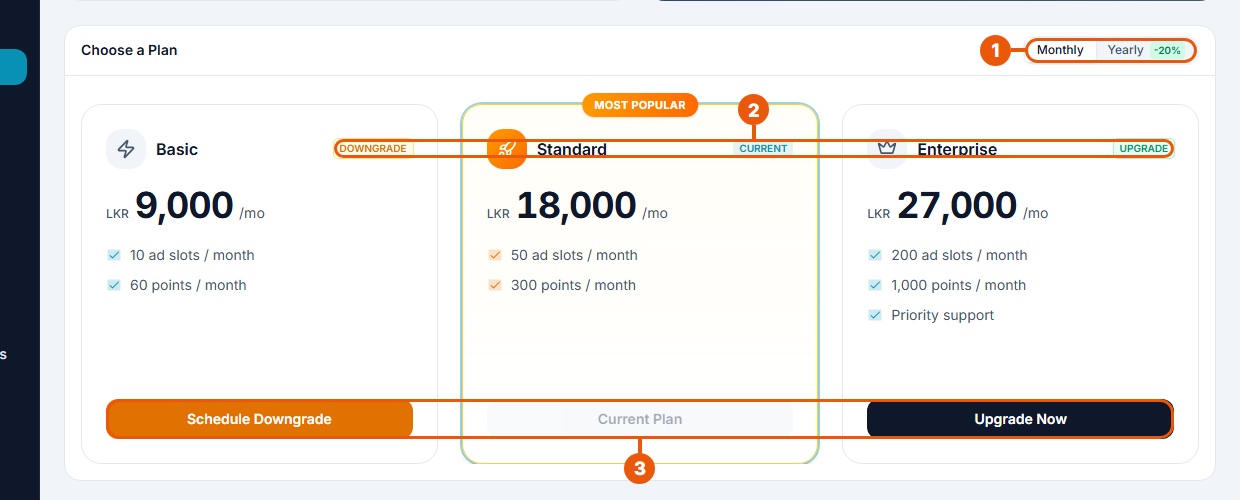
Monthly / Yearly: see the prices for each way of paying.
Labels: Current is your plan. Upgrade and Downgrade show which way a change would go.
Buttons: Upgrade Now, Schedule Downgrade, or Subscribe Now if you have no paid plan yet.
At the bottom, Subscription History lists your past and present plans with their dates and status.
Related articles
Was this article helpful?
If you still have questions, our support team is here to help.
Submit a Support TicketNot signed in? Sign in first
